Create a printable unit circle reference or worksheet with degrees, radians and exact coordinates. Hide angles or coordinate values for practice, colour the quadrants and include a filled answer page.
Live preview210 × 297 mm
A4
Preview is scaled to fit. The PDF keeps the exact dimensions.
PDF and Print include all pages. PNG and SVG save the page shown.
For true-size printing: choose 100% / Actual size, match the paper size and turn off headers and footers. Printing guide ↗
Ready for your printer
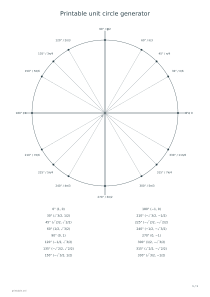
The unit circle connects an angle to the point reached on a circle of radius one. Its horizontal coordinate is cosine and its vertical coordinate is sine. This printable focuses on sixteen standard angles, giving a compact reference and a matching way to practise recalling exact values.
💡A few useful answers
Why are cosine and sine in that order?
An ordered pair is written (x, y). On the unit circle, x equals cos θ and y equals sin θ, so the printed pair is (cos θ, sin θ). At 90° the point is (0, 1), which makes the order especially easy to check: cosine is zero and sine is one.
Does the sheet include negative angles or tangent?
It displays one nonnegative turn of sixteen standard positions and their exact coordinates. It does not print a separate negative-angle table or tangent values. You can use coterminal angles and the coordinates for further work, but those additional results are not generated or checked by this worksheet.
Will the circle still be mathematically correct if the printer scales it?
Uniform scaling changes the physical drawing size while preserving its angle relationships. The term unit circle refers to the mathematical coordinate radius of one, not one centimetre on paper. Use the matching paper format for a clear print; do not infer calibrated physical measurements from the diagram.
Connect angles to coordinates
📐The circle is centred at the origin and starts at the positive x-axis. Positive angles run counterclockwise. The reference includes 0°, 30°, 45°, 60°, 90° and the corresponding standard positions through 330°. It does not add a separate point for 360°, because one complete turn returns to the same position as zero.
Choose degrees, radians or both beside the circle. Radian values use exact multiples of π, such as π/6 for 30° and 3π/2 for 270°. The coordinate table uses exact fractions and radicals rather than rounded decimals. At 60°, for example, the point is (1/2, √3/2), so cosine is one half and sine is the square root of three divided by two.
Choose what the worksheet hides
Filled-reference mode prints the available values. Blank-angle mode replaces the angle labels with numbered prompts, blank-coordinate mode leaves the coordinate entries empty, and the combined mode hides both. Numbered positions let you match a point on the circle to its row even when the angle itself is missing. Optional answers restore the complete information.
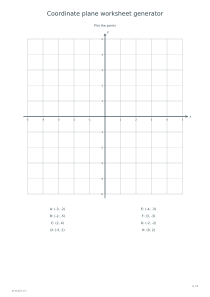
Use quadrant signs as a check before filling a fraction. In quadrant I both coordinates are positive; in II only y is positive; in III both are negative; in IV only x is positive. Points on an axis have one coordinate equal to zero. The coordinate plane worksheets give separate practice in reading those horizontal and vertical positions.
Check signs before memorising values
✏️Compare mirrored angles rather than memorising sixteen unrelated pairs. For instance, 45°, 135°, 225° and 315° share the same absolute coordinate values, while their signs follow the quadrant. A protractor can help with the angle direction, but measuring this printed picture is not how the exact trigonometric values are calculated.
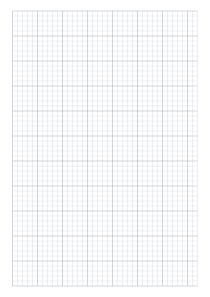
The colour option distinguishes the four groups of rays while retaining the axis labels and table. The mathematical radius is one regardless of the diagram’s physical size on A4, A3 or Letter. Use graph paper for subsequent sine and cosine sketches; this tool prints a circle and value table rather than a function graph or an interactive calculator.
Printable unit circle generator
Circle worksheet: Filled reference
For an exact-value reference, choose both degree and radian labels, filled-reference mode and the coordinate table. Leave quadrant colours off for a simple monochrome sheet. Check the 30° row: it shows π/6 at the circle and coordinates (√3/2, 1/2), avoiding decimal approximations.
For coordinate recall, select radians, blank coordinates and an answer sheet. Keep the coordinate table visible and enable quadrant colours if helpful. Fill the row at 5π/4 with (−√2/2, −√2/2), then compare it with the separate filled page; both signs must be negative in quadrant III.