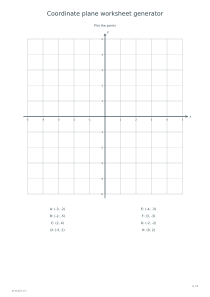
Create coordinate plane worksheets for plotting points, reading ordered pairs or joining points into a picture. Choose the quadrants and scale, then include a matching answer sheet when needed.
Live preview210 × 297 mm
A4
Preview is scaled to fit. The PDF keeps the exact dimensions.
PDF and Print include all pages. PNG and SVG save the page shown.
For true-size printing: choose 100% / Actual size, match the paper size and turn off headers and footers. Printing guide ↗
Ready for your printer
These worksheets turn a coordinate grid into a specific task. Learners can place supplied ordered pairs, identify the locations of marked points or connect a numbered sequence. The axes and task list are generated together, so the answer page uses the same positions rather than a newly arranged grid.
💡A few useful answers
Does the generator accept my own point list?
This version creates seeded point sets and two supplied closed outlines. It does not accept custom coordinate lists or imported pictures. You can write extra pairs by hand on a printed sheet, but those additions will not appear in the generated answer page or a saved design link.
Can points lie directly on an axis?
Yes. Zero is an allowed coordinate, so a point may lie on the x-axis, y-axis or origin. Such points should not be assigned to one of the four open quadrants. Read the pair itself: a zero second coordinate means the point lies on the horizontal axis.
Why does the picture remain the same when I change the scale?
The house and kite are defined in grid steps. Increasing the units per step multiplies their coordinate values while leaving the geometric outline in the same cells. This makes it possible to practise different axis scales without changing the shape students are expected to produce.
Set the grid range and scale
📍First-quadrant mode shows nonnegative x and y positions. Four-quadrant mode includes negative coordinates on both axes. Select five or ten grid steps from zero, then choose one, two or five units per step. The displayed range is the step count multiplied by the scale: five steps at two units reach ten, not five.
The horizontal coordinate comes first in each ordered pair. From the origin, move along x and then vertically along y. On a four-quadrant sheet, a negative x lies left of zero and a negative y lies below it. Use a number line first if a learner is still unsure how negative values relate to the origin.
Choose a coordinate activity
Plot mode lists four, eight or twelve distinct points and leaves the grid unmarked. Read mode marks and labels the points, then leaves their ordered pairs empty below the diagram. The answer option fills the missing information. Random point sets are repeatable through the arrangement code, but changing the quadrant selection or range changes their interpretation.
Join-the-points mode uses a fixed house or kite outline instead of random points. Follow the numbered list in order; the last point returns to the first to close the figure. The selected scale multiplies the coordinates while preserving their positions in grid steps. For a different counting activity, try the connect-the-dots generator.
Check the reasoning behind the plot
✏️Before a worksheet is handed out, check one listed pair against the labelled axes. Pay particular attention to the scale: a point two grid squares right of zero has x = 4 when each step is worth two. Students often read squares correctly but forget the unit value. The printed list and the answer grid let you discuss that difference explicitly.
Keep plotting and free sketching as separate tasks when the goal is accuracy. A picture that looks plausible can still contain an exchanged x and y value. Use blank graph paper for open-ended drawings afterwards, and retain this worksheet when you need a reproducible set of coordinates and a specific answer key.
Coordinate plane worksheet generator
Quadrants: First quadrant
For a first plotting task, choose the first quadrant, five grid steps, one unit per step, four points and code 11. Select Plot the points and enable answers. The worksheet lists four different ordered pairs between zero and five; the second page marks their matching locations.
For a picture with negative values, choose four quadrants, five grid steps, scale 2 and the house drawing. The sequence begins at (−4, −2), runs through (4, −2), (4, 2), (0, 6) and (−4, 2), then closes. The answer joins exactly that sequence on the same grid.