Free · No sign-up

Printable protractor.

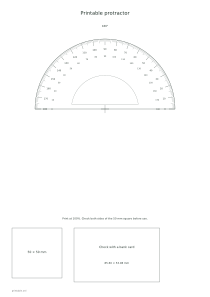
Print a semicircular or full-circle protractor with degree marks, a centre cross and optional reverse numbering.

Make it yours

01 The page
Orientation
02 Measurement settings

The diameter changes the spacing between degree marks, not the angles themselves.

03 Ink color
Ink color
Paper color

Print at 100%. Check both sides of the 50 mm square before use.

○ Free · No sign-up

Live preview210 × 297 mm
A4

Preview is scaled to fit. The PDF keeps the exact dimensions.

Ready for your printer

Custom color

Ink color

Use left and right arrows for saturation, up and down for brightness. Hold Shift for larger steps.

Printable protractor

Measurement settings

The diameter changes the spacing between degree marks, not the angles themselves.

A few useful answers

What can I customize?

Angles: 180° / 360°; Diameter: 80–250 mm.

How do I use this template?

Align the centre with the vertex and the zero line with one ray.

What should I check?

Uneven horizontal and vertical stretching distorts angles; compare both calibration directions.
Printable protractor

Choose 180° for ordinary geometry exercises and 360° for full rotations.

Cut the optional inner windows carefully while preserving the centre bridges.

Angles: 180°

Use these settings: Paper size: A4; Orientation: Portrait; Angles: 180°; Diameter: 140 mm.

Open this example

Angles: 360°

Use these settings: Paper size: A4; Orientation: Portrait; Angles: 360°; Diameter: 160 mm.

Open this example