Free · No sign-up

Printable set squares.

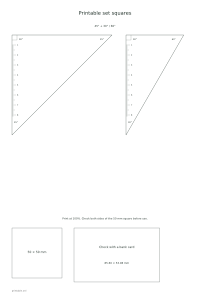
Generate printable 45° and 30°/60° set squares for drawing and checking standard angles.

Make it yours

01 The page
Orientation
02 Measurement settings

The length setting describes the longer perpendicular side, not the diagonal.

03 Ink color
Ink color
Paper color

Print at 100%. Check both sides of the 50 mm square before use.

○ Free · No sign-up

Live preview210 × 297 mm
A4

Preview is scaled to fit. The PDF keeps the exact dimensions.

Ready for your printer

Custom color

Ink color

Use left and right arrows for saturation, up and down for brightness. Hold Shift for larger steps.

Printable set squares

Measurement settings

The length setting describes the longer perpendicular side, not the diagonal.

A few useful answers

What can I customize?

Angles: 45°, 30° / 60°; Long perpendicular side: 50–220 mm.

How do I use this template?

Cut the outer triangle and align a straight edge with your drawing.

What should I check?

Paper needs a firm backing for tracing; cut edges determine how neatly lines follow.
Printable set squares

Print the pair to compare an isosceles right triangle with a 30°/60° triangle.

Larger pairs may use separate sheets while retaining their requested dimensions.

Long perpendicular side: 100 mm

Use these settings: Paper size: A4; Orientation: Portrait; Long perpendicular side: 100 mm; Angles: 45° + 30° / 60°.

Open this example

Long perpendicular side: 160 mm

Use these settings: Paper size: A4; Orientation: Portrait; Long perpendicular side: 160 mm; Angles: 45° + 30° / 60°.

Open this example