Make five-, ten- or twenty-frame cards for counting dots, completing a target or displaying a chosen quantity. Select the activity and card count, with answers where the activity supports them.
Live preview210 × 297 mm
A4
Preview is scaled to fit. The PDF keeps the exact dimensions.
PDF and Print include all pages. PNG and SVG save the page shown.
For true-size printing: choose 100% / Actual size, match the paper size and turn off headers and footers. Printing guide ↗
Ready for your printer
A frame arranges quantities into recognizable groups instead of leaving every collection as scattered objects. Filled and empty cells play different roles: dots show an existing quantity, while open spaces show room within the frame. Explain the activity before starting, because counting existing dots differs from adding dots to reach a target. Ask learners to name the quantity, describe its parts and explain how the arrangement helps them recognize it.
💡A few useful answers
Is a completely empty frame a valid question?
Yes. It can mean zero in counting mode or a starting state in completion mode. In Blank Frames, every card is intentionally empty. Read the activity and any target number before deciding what the learner should do with the open cells.
Why do model and blank modes have no answers?
The model already displays the quantity you chose, and blank frames are for an activity you supply later. Neither hides a randomly generated question. Separate keys are available for counting and completion, where there is a specified number or completed pattern to check.
Should I draw the whole target in completion mode?
Not in addition to the existing dots. The target is the final total, so add only the difference. Have the learner state how many dots are present, how many are being added and how many should remain at the end before checking the pattern.
Choose the frame capacity and activity
✏️Capacity five uses one row of five cells. Ten uses two rows of five, and twenty uses two separate ten-frames. This visible structure supports discussion of fives and tens without assigning an automatic age or grade level. Show the first cell and filling direction before independent work. Dots fill left to right, row by row from the top, giving the same quantity a consistent pattern that can be compared across cards.
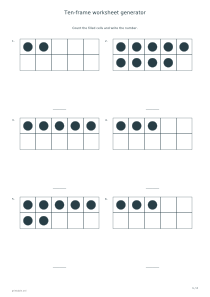
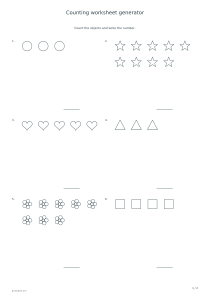
Count Frames shows a seeded quantity from zero through the selected capacity and leaves a number blank. An entirely empty frame can therefore represent a valid answer of zero. Picture-counting worksheets provide a separate bridge from less structured collections. Compare the same quantity in a frame and in a scattered group to see whether a learner recognizes the structure or still relies on counting every individual dot from the beginning.
Follow a consistent filling order
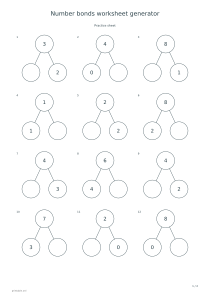
Complete Frames gives a target number and some starting dots. Add only enough dots to reach the target; do not draw the complete target again beside those already present. Count the starting quantity, then determine the missing part. The key shows the exact completed pattern in filling order. Number-bond worksheets extend that relationship between parts and a whole. The number added and the final total are different quantities worth naming separately.
Model Frames repeats a quantity you choose, from zero through capacity. It is useful for examining a known number together or providing matching cards to a group. Blank Frames leaves all cells empty for later drawing or your own counters. These two modes have no answer pages because they do not generate an unknown question to solve. A previously enabled answer setting does not create a hidden key for a blank template or model.
Distinguish existing dots from the target
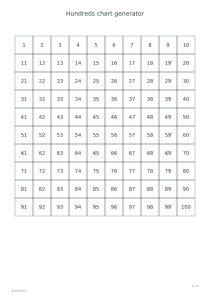
📝Choose six, twelve or twenty-four cards, with six on each sheet. The arrangement code controls quantities in counting and completion modes; the model follows your chosen quantity. A hundreds chart offers a wider view of written numbers, while frames represent one quantity through dots. Connect those views without confusing their purposes. The total number of cells printed on a page is not automatically the number represented by one individual card.
For counting and completion, optional keys follow all exercise pages. Ask learners to explain their method before comparing a number or completed pattern. PDF and Print include the full set; PNG, SVG and Share use the selected preview page. The editor does not recognize handwritten additions. Check those together, especially when a learner reaches the correct total using a different dot arrangement: understanding the quantity and following the agreed filling convention are related but separate questions.
Ten-frame worksheet generator
Six ten-frames to count
Choose capacity ten, Count Frames, six cards and arrangement code 17. Enable answers. One card page is followed by its key. Learners inspect the two rows of five, identify each quantity and write its number, including zero if an empty frame appears.
Choose capacity twenty, Complete Frames, twelve cards and arrangement code 31, with answers enabled. Every card uses two separate ten-frames. Two exercise pages are followed by their matching keys. Count the existing dots, then add the missing quantity instead of drawing the whole target again.