Create counting worksheets with clear, separated shapes and checked answer keys. Count every object in a group or find only a target symbol, then choose the maximum quantity and the number of exercises to print.
Live preview210 × 297 mm
A4
Preview is scaled to fit. The PDF keeps the exact dimensions.
PDF and Print include all pages. PNG and SVG save the page shown.
For true-size printing: choose 100% / Actual size, match the paper size and turn off headers and footers. Printing guide ↗
Ready for your printer
Counting a group and selecting a group are related but different tasks. Begin by matching one spoken number to each visible object, then introduce mixed symbols when the learner is ready to decide which objects belong in the count. The layout keeps drawings apart so the quantity does not depend on interpreting overlapping pictures.
💡A few useful answers
Does Maximum 10 mean there are ten objects in every group?
No. It permits quantities from one through ten. The generated worksheet may contain repeated quantities and does not guarantee a complete sequence. Choose a particular arrangement code and inspect the preview if you need a specific mix for a lesson.
Can a target-only question contain no matching symbols?
Every generated target question includes at least one matching symbol. Other objects may be distractors, and some groups may happen to contain only the target. The key still counts the actual drawn matches rather than applying a fixed proportion.
Why use shapes instead of detailed picture scenes?
Clear symbols make the boundaries of each counted object visible and keep the worksheet reproducible. They are useful for discussing quantity without requiring a child to identify a complicated scene. There is no photo upload or automatic object detection in this editor.
Separate number practice from visual selection
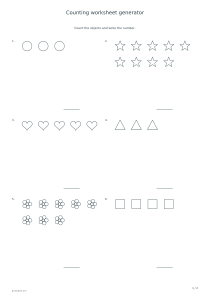
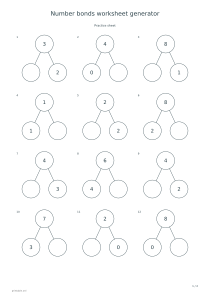
✏️The all-objects mode fills each group with one of six original symbols: a circle, star, heart, triangle, flower or square. The task is to count every visible object and record the total. A learner can point to each item, cross it off lightly or move through the rows in order. Follow up with a number-bonds worksheet when you want to discuss how a total splits into parts.
Target-only mode introduces other symbols into the same group. A small model beside the answer line identifies the one to count. The printed answer equals the number of matching symbols actually drawn, not the overall group size. Encourage the learner to name the target first and explain what should be ignored; otherwise an incorrect answer may reflect misunderstanding the selection rule rather than a counting mistake.
Set a manageable quantity range
Choose a maximum of five, ten or twenty objects. This caps each group rather than promising that every quantity up to the maximum will appear on one page. Small and large groups may occur in the same set, and quantities can repeat. The arrangement code recreates that particular set, which is useful when preparing a matching key or returning to an earlier discussion.
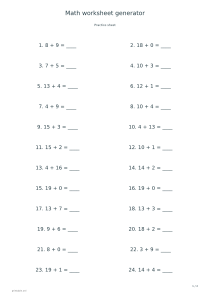
Six questions fit on each exercise page. The six-, twelve- and twenty-four-question choices create one, two or four practice pages before any solutions. Start with a short sheet if maintaining one-to-one counting is the main challenge. Once the learner can explain the count consistently, a custom arithmetic worksheet can connect these concrete quantities to written addition or subtraction.
Use counts as evidence for a discussion
📝All drawings use independent positions in a regular area, with space between neighboring objects. A flower counts as one symbol even though it contains several petals; this is worth agreeing on before beginning. For the same reason, count complete stars rather than their points. The model represents an object category, and its internal decorative lines are not separate items in the answer.
Use the answer pages to check the result and to invite a second counting strategy. A learner might group objects in fives, count by rows or identify a missed item. If a hands-on marking activity would help, try dot-marker picture sheets separately. Those pages focus on filling physical circles, while this worksheet asks for numerical totals or a selected subset.
Counting worksheet generator
Count complete groups up to ten
Use Count every object, maximum 10, six exercises and arrangement code 17, with answers enabled. Portrait A4 produces one practice page and its key. Each question uses a single kind of symbol so the learner can focus on counting the whole group.
Select Count the target symbol, maximum 20, twelve exercises and arrangement code 31. Keep answers enabled on portrait A4. Two practice pages are followed by two key pages; the small model beside each answer line identifies which symbols belong in the count.