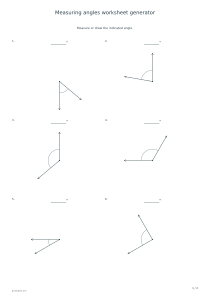
Create exercises for measuring or drawing acute, right and obtuse angles. Choose a degree step, rotate the baseline when useful and include answer pages showing the intended geometry.
Live preview210 × 297 mm
A4
Preview is scaled to fit. The PDF keeps the exact dimensions.
PDF and Print include all pages. PNG and SVG save the page shown.
For true-size printing: choose 100% / Actual size, match the paper size and turn off headers and footers. Printing guide ↗
Ready for your printer
Angle work connects a number of degrees with the opening between two rays. Measuring begins with placing a protractor at the vertex; drawing begins with a given baseline and a requested angle. Ask learners to estimate whether the angle is acute, right or obtuse before reading the scale.
💡A few useful answers
Why can the full range include a right angle?
The full range allows acute, right and obtuse angles that are multiples of the selected step. Ninety degrees fits all three available steps. Choose Acute or Obtuse if you want only that category. Zero and straight angles are excluded, so every generated question remains strictly inside the stated limits.
Which way should I draw the second ray?
Work counterclockwise from the given baseline. The same numerical opening on the opposite side is not the requested construction. Identify the starting ray and the direction of the turn before marking the degrees. The answer adds the second ray so you can compare its placement as well as its angle.
Does rotating the baseline change how an angle is measured?
The rule stays the same: measure the opening between the rays rather than their direction on the page. Rotation requires the learner to align the protractor even when the baseline is not horizontal. It checks understanding of the method instead of familiarity with one commonly drawn orientation.
Choose measurement or construction
✏️Measure Angles shows both rays and an arc identifying the intended interior angle. The learner writes the measurement, and the key adds its degrees. Draw Angles shows a baseline and a given value; the learner constructs the second ray counterclockwise from that baseline. The answer page adds the missing ray for comparison. Mixed combines both tasks. Read each prompt first so a learner does not try to measure an angle whose second ray has not yet been drawn.
Choose the full range, acute angles only or obtuse angles only. Every generated value is strictly between zero and one hundred eighty degrees. Right angles may appear in the full range. A five-, ten- or fifteen-degree step restricts values to multiples of that step. It does not mean adjacent questions form an increasing sequence, or that the difference between two consecutive answers always equals the selected step.
Align the vertex and baseline
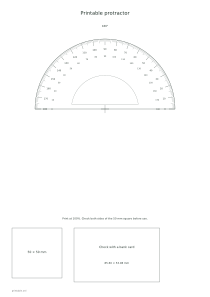
Use a suitable protractor or a printable protractor whose shape has been printed correctly. Place its center on the vertex and align its zero line with the baseline. Choose the scale that starts at zero on that side. A shifted center or the opposite scale can produce a plausible but incorrect reading. Ask the learner to show the zero and reading direction before recording a value, especially when an obtuse angle is confused with its acute supplement.
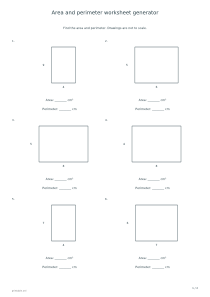
Baseline rotation turns the starting ray in thirty-degree increments. The angle is still determined by the geometry rather than by the page orientation. For a broader geometry activity, use area and perimeter worksheets, while distinguishing angle measure from side length. Turning the whole drawing does not change the opening between its rays; the protractor must be aligned with the actual baseline in each question.
Check the direction and marked interior angle
📝For construction, locate the requested value counterclockwise from the baseline, mark a small point and draw the new ray from the shared vertex. Do not connect the point to an arbitrary position along the existing line. Measure the completed angle again as a check. Later work with right triangles can use a Pythagorean theorem worksheet. That activity introduces relationships between lengths, while this one remains focused on reading and constructing the requested degree measure.
Choose six, twelve or twenty-four exercises, with six per practice page. The arrangement code, range, step and rotation setting together define a repeatable set. Optional answers follow all exercise pages. PDF and Print include the complete set, while PNG, SVG and Share use the selected preview page. The generator supplies geometry consistent with its key, but it does not recognize a handwritten ray or automatically grade measurement accuracy.
Measuring angles worksheet generator
Measure rotated angles
Select Measure Angles, the full angle range, a ten-degree step, six exercises and arrangement code 17. Enable baseline rotation and answers. One practice page shows both rays and the interior arc; its key supplies the measurements. Realign the protractor with each baseline before reading the scale.
Select Draw Angles, Acute, a five-degree step, twelve exercises and arrangement code 31. Turn rotation off and keep answers on. Learners construct the second ray counterclockwise on two practice pages. The matching answer pages allow a later comparison of the position and size of each constructed angle.