Generate pairings for two to twelve participants, with one or two meetings per pair. Print the rounds, blank score spaces and an optional standings table for manual recording.
Live preview210 × 297 mm
A4
Preview is scaled to fit. The PDF keeps the exact dimensions.
PDF and Print include all pages. PNG and SVG save the page shown.
For true-size printing: choose 100% / Actual size, match the paper size and turn off headers and footers. Printing guide ↗
Ready for your printer
Set the participant count and optionally enter exactly that many distinct names, one per line. An empty list uses localized numbered participants. Single-cycle mode pairs every participant with every other participant once. Double-cycle mode adds a second cycle with the order of each pair reversed. The editor creates a pairing schedule; it does not choose dates, venues, scoring rules or a winner.
💡A few useful answers
Will every participant meet every other one?
Yes. Each unordered pair occurs once in a single cycle and twice in a double cycle. The second occurrence reverses the displayed order. Pair completeness is independent of whether the participant count is even or odd.
What happens with an odd participant count?
One participant has a bye in every round. Across a single cycle, each participant receives one bye and still meets every other participant. The bye is printed by name so it is visible when organizing the games.
Does the standings page calculate a winner?
No. The standings table is blank and intended for handwriting. You decide scoring and tie-break rules, record match results and calculate any totals yourself. The generator does not accept scores, rank participants or create an elimination bracket.
Build a complete set of pairings
✏️The generator uses the circle method to rotate participants through rounds. With an even number, everyone has one match in each round, and a single cycle needs one fewer round than the participant count. With an odd number, one participant has a bye in each round, so the cycle needs as many rounds as there are participants. Each pair still meets exactly once. A bye is a scheduled rest, not a loss or an automatically awarded score.
Names are labels, not account identities. Use short, distinct team or player names that fit within twenty-four combined characters. Keeping a deliberate input order is helpful when comparing paper copies. If you change the count, supply a matching list or clear it to return to numbered participants. The editor rejects missing names or duplicates instead of silently assigning two entries to the same label. A sign-in sheet can help collect names before preparing the schedule.
Understand rounds and byes
Double-cycle mode repeats the same pairings in a second cycle with the two displayed participants exchanged. That can be useful when a game distinguishes first and second positions. It does not guarantee balanced home and away streaks, court allocation or equal rest between timed matches. Those are additional scheduling problems beyond this printable. Decide any first-move, hosting or location rule explicitly rather than assuming the order of a name solves it.
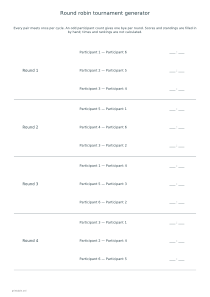
Four rounds are printed per page, each with a blank score area beside every match. An odd-count round also names the participant with a bye. These are round groupings, not time slots: games can be organized within a round according to your available tables or playing areas. For a pencil-and-paper activity that needs its own playing sheet, the dots and boxes generator creates boards independently of the pairing schedule.
Keep scores and standings by hand
📝The optional standings page has empty columns for played games, wins, draws, losses and points. You fill these in by hand according to rules agreed before play. No score is entered into this editor, and no ranking, tie-break or qualification is calculated. If your game cannot end in a draw, leave that column unused. Keep match results legible so any arithmetic in the standings can be traced back to the recorded games.
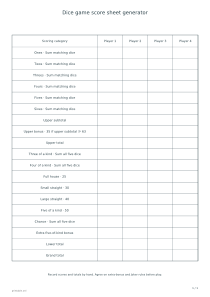
Preview the last page as well as the first, especially for a longer double cycle. A4, A3 and US Letter work in either orientation. PDF and Print include every round and the optional standings sheet; SVG and PNG use the selected page. Share publishes participant names and configuration with the preview, so consider numbered labels for a public example. A separate dice score sheet can record detailed game categories while the tournament sheet records only each match result.
Round robin tournament generator
Six participants, one cycle
Choose six participants, leave names empty, select one meeting per pair and include the standings table. A4 portrait produces five rounds with three matches each, spread over two schedule pages, followed by a blank standings page.
Choose five participants, leave names empty, select two meetings per pair and include standings. The ten rounds each contain two matches and a named bye. A4 portrait produces three schedule pages and one blank standings page.