Create a printable sign-in sheet with an event heading, date, place and your own columns. Choose the number of blank rows and export a clear registration form.
Live preview210 × 297 mm
A4
Preview is scaled to fit. The PDF keeps the exact dimensions.
PDF and Print include all pages. PNG and SVG save the page shown.
For true-size printing: choose 100% / Actual size, match the paper size and turn off headers and footers. Printing guide ↗
Ready for your printer
A sign-in sheet gives participants a consistent place to record the details an event actually needs. This editor creates numbered blank rows rather than collecting information online. It is useful for a workshop, meeting, class or volunteer session when a paper record fits the workflow. Decide what information is necessary before choosing the columns, and leave enough room for handwriting.
💡A few useful answers
Does the form register people online?
No. It generates a blank printable table. Participants write on the paper, and the website does not receive their handwritten entries. There is no attendance database, email confirmation or digital signature service attached to this editor. Use the event and column fields to prepare the paper form before the session.
Can the columns have different widths?
This version divides the available table width equally between the headings you enter, with a separate narrow number column. If a heading needs more space, shorten the other headings, use fewer columns or switch to landscape. The tool does not offer draggable column boundaries or merge cells across the table.
What happens when I ask for more rows than fit?
The rows continue onto additional sheets, using twenty per portrait page or twelve per landscape page. Numbering continues across the document, and every page repeats the event information and headings. The final sheet contains only the remaining requested rows, so you can see exactly how many blank entries the form provides.
Build the form around the event
✏️Start with the event, date and place fields so that loose sheets can be identified later. These are short text fields, not calendar controls: you can enter a single date, a date range or a brief session description. Keep the heading understandable without relying on a separate poster that may no longer be beside the sheet after the event.
Leave the column-headings field empty to use the localized Name, Signature and Notes headings. For another layout, enter one heading per line, with up to five columns and thirty grapheme clusters per heading. Columns have equal width. Avoid adding a long list of contact fields merely because space is available; a name-label sheet may serve the introduction task more directly.
Give participants readable writing space
The generator provides between five and sixty blank numbered rows. Portrait sheets hold twenty rows each, while landscape sheets hold twelve. Extra rows continue on another page and preserve the numbering. Reducing the requested row count reduces the occupied table height; it does not invent participant records or automatically fill in names from another document.
Choose landscape when longer headings or broader handwritten entries need horizontal room. Portrait is convenient for a compact list that will be clipped to a board. For an event where each participant also needs a distinct ticket or reference number, prepare those separately with the numbered-ticket generator. The sign-in row number is simply a position in this paper list.
Keep a practical paper record
📝Preview the form with the exact headings you plan to use, then print a test page. Check whether an ordinary handwritten entry fits in each cell and whether the event line still identifies the session clearly. Use a neutral ink color for the table and keep a light paper background unless a different combination has been checked on the actual printer.
Arrange the completed sheets according to your event’s record-keeping process. The editor does not track attendance automatically, verify signatures or decide how long records should be retained. For recurring classes, the class schedule generator helps communicate when sessions happen, while this form records who signs in at a particular session. Keep participant information off public example or Share links.
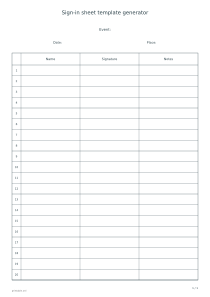
Sign-in sheet template generator
A standard twenty-person form
Use A4 portrait with twenty blank rows and leave the custom headings empty. The one-page template shows the default Name, Signature and Notes columns. Fill in the event, date and place if needed, then check handwriting space before printing copies for the session.
Choose A4 landscape and thirty blank rows with the default three columns. The document has three pages containing twelve, twelve and six rows. The row numbers continue from one through thirty, while the wider columns provide more horizontal space for a note or signature.