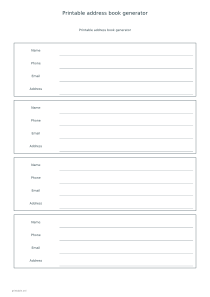
Create blank contact pages or print a small address book from entries you supply. Choose roomy cards, change the field headings and keep the result ready for handwriting.
Live preview210 × 297 mm
A4
Preview is scaled to fit. The PDF keeps the exact dimensions.
PDF and Print include all pages. PNG and SVG save the page shown.
For true-size printing: choose 100% / Actual size, match the paper size and turn off headers and footers. Printing guide ↗
Ready for your printer
Choose three, four or six contact cards per sheet. For an empty notebook insert, leave Contacts blank and set the total number of blank cards. To prefill a page, enter one contact per line using four fields separated by vertical bars: name, phone, email and address. The editor accepts up to twelve contacts, so you can prepare a focused family, club or project list without uploading a spreadsheet.
💡A few useful answers
Can I make an entirely blank address book?
Yes. Leave Contacts empty and choose between three and twenty-four blank cards. The editor repeats the four headings on every card and divides the chosen total across sheets using your cards-per-page setting.
Are contacts imported from my device?
No. This editor uses only the text you type or paste into its fields. It does not read a device address book, synchronize accounts or infer missing details from a name. Review any pasted information yourself.
Why does sorting look different from a local directory?
The sort is based on Unicode character order, not a language-specific surname or alphabet rule. Accented characters and different scripts can therefore appear in an unexpected order. Turn sorting off and arrange the input lines manually when order matters.
Give every contact enough writing space
✏️Contact cards organize information as four horizontal fields inside a bordered block. Three cards per page provide the most vertical space for a long postal address or later corrections. Six cards make a compact reference for short entries. The number of cards per page controls the layout, while the blank-card count controls the length of an empty booklet. The last page can contain fewer cards when the total does not divide evenly.
Each prefilled line must contain four fields, separated by the | character. A name is required; the other fields may be empty, but keep their separators so the information stays in the intended place. Each field accepts up to sixty combined characters. For a multi-part street address, use commas within the final field rather than line breaks, because every new line starts another contact. Check especially that a phone number has not slipped into the email field.
Prepare entries and field labels
The four headings can be replaced with short labels separated by the same vertical-bar character. For example, a project list might need a role or a preferred contact time in place of a postal address. The generator prints your labels as entered and does not validate an email address or telephone format. If you only need names on adhesive stock, use the label generator rather than trying to cut these notebook cards into a label sheet.
Sorting is optional and applies to entered names. It uses normalized Unicode order, which is a deterministic computer order and may differ from the alphabetic convention used in your language. Leave sorting off to preserve a deliberate family, team or department order. The generator does not remove duplicate contacts or merge records: two similar names could be different people, and deciding whether they belong together is a job for the person preparing the list.
Keep a practical paper reference
📝Before printing several copies, preview every page and read the longest contact at its final scale. A4, A3 and US Letter support portrait or landscape. Landscape offers wider fields, while a larger sheet can help when you expect substantial handwritten notes. Keep a blank card after a frequently changing group so updates can be added without crossing out crowded lines. A separate lined note page can hold directions or details that do not fit a short contact field.
Ordinary editing and exports happen locally in the browser. Download a PDF for the complete set or an SVG or PNG for the currently selected page. Explicit Share publishes the entered contacts and selected preview to anyone with the link; consider using an empty sample when demonstrating a layout. For a list that needs action boxes rather than contact details, the checklist editor provides a more suitable structure.
Printable address book generator
An eight-card household insert
Leave Contacts empty, choose four cards per page and set Blank cards to 8. A4 portrait produces two pages with four cards each. Keep the default name, phone, email and address headings, then write the details after printing.
Select three cards per page and six blank cards, again with no entered contacts or custom headings. The two A4 portrait pages provide taller fields than the first example. This layout is useful when handwritten street addresses need more room.