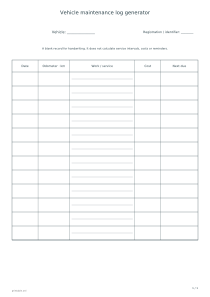
Print a blank maintenance record with columns for dates, odometer readings, work, costs and the next due note. Choose row count, writing height and an odometer unit.
Live preview210 × 297 mm
A4
Preview is scaled to fit. The PDF keeps the exact dimensions.
PDF and Print include all pages. PNG and SVG save the page shown.
For true-size printing: choose 100% / Actual size, match the paper size and turn off headers and footers. Printing guide ↗
Ready for your printer
A maintenance log brings handwritten records for one vehicle into a consistent table. Each row connects a date and odometer reading with work actually performed, its cost and your own next-due note. It is a recordkeeping sheet, not a service recommendation. Decide how much description you normally need before choosing row height: a short label and a detailed account of a repair require different amounts of writing space.
💡A few useful answers
Will the log tell me when a service is due?
No. It provides space for a note based on information you supply. It does not read a service schedule, assess wear or send reminders. A blank Next Due cell is not a recommendation calculated from the previous date, vehicle description or odometer reading.
Does changing kilometres to miles convert anything?
No. The option changes the odometer heading only. Values are written by hand after printing. Use a consistent unit and clearly identify any separate conversion so a future reader does not compare two different measurements as if they were the same.
Why can the same row count need more pages?
Pagination depends on row height, paper size and orientation. Larger rows make longer notes easier to read but reduce the number that fits on a sheet. Inspect the whole preview before printing; fewer pages are not helpful if the handwriting space becomes inadequate.
Identify the vehicle and odometer unit
✏️The vehicle field allows up to sixty visible characters; the registration or identifier allows twenty. A short description helps distinguish sheets stored in the same folder. These fields do not verify ownership or connect to a vehicle registry. They label your paper record. If you plan to share the blank design publicly, use an appropriate generic identifier rather than assuming a registration entered into the editor will remain private after sharing.
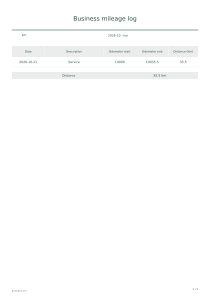
The five columns are Date, Odometer, Work or Service, Cost and Next Due. An empty cell means no information has been written there; it does not imply zero cost or an estimated date. Keep an unknown entry blank or add your own clear notation by hand. This is not a travel reimbursement record. Use a business mileage log for journeys and distance claims, while this sheet remains focused on maintenance work.
Allow room for useful service descriptions
Kilometres or miles changes the label on the odometer column only. It does not convert readings or alter the other columns. Keep a consistent unit within a record so later comparisons remain understandable. If copying an older entry recorded in a different unit, handle any conversion separately and identify it clearly. Selecting a unit does not validate the accuracy or chronological order of the readings you later write on paper.
Choose twelve, twenty-four or thirty-six total rows, with a row height of ten, fourteen or eighteen millimetres. Taller rows provide more room but can require more sheets. Paper size and orientation also affect pagination. Optional extra writing lines appear inside service cells. Several lines in one cell still belong to the same maintenance entry; they do not create separate dates, odometer readings or additional records within that row.
Keep records separate from service recommendations
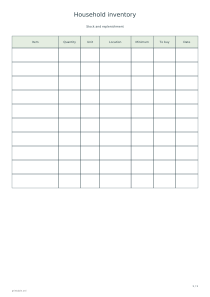
📝A household inventory can separately track parts or equipment kept in storage. Here, describe the work clearly enough to connect the entry with a receipt or other supporting document later. The editor does not upload receipts, import completed rows or save the handwriting added after printing. If the record spans several sheets, label and arrange them so another reader can follow the chronology without guessing which page comes next.
Next Due is a blank note, not an automatic reminder or recommended interval. Tasks you determine yourself can be tracked on a separate checklist. There are no cost totals, service calculations or repair suggestions. PDF and Print include every generated page; PNG, SVG and Share use the selected preview page. Editing and exports are local, while explicit Share publishes entered vehicle labels and settings. Review those fields before distributing a link.
Vehicle maintenance log generator
Twelve entries on one sheet
Choose twelve rows, a 14 mm row height, kilometres, extra writing lines and portrait A4. The result is one blank record page. Connect each future entry with its date and odometer reading, keeping the service description within the corresponding row rather than continuing into the next entry.
Choose twenty-four rows at 18 mm, miles, no extra writing lines and landscape A4. The table spans multiple pages. The unit labels the odometer without converting anything; work descriptions, costs and next-due notes remain blank for handwriting on the printed sheets.