Free · No sign-up

Printable piano keyboard generator.

Create a paper piano keyboard with one to four octaves, letter names or fixed-do syllables, blank keys and highlighted notes. Print several copies for music lessons and written exercises.

Make it yours

01 The page
Orientation
02 The details
03 Ink color
Ink color
Paper color

○ Free · No sign-up

Live preview210 × 297 mm
A4

Preview is scaled to fit. The PDF keeps the exact dimensions.

Ready for your printer

Custom color

Ink color

Use left and right arrows for saturation, up and down for brightness. Hold Shift for larger steps.

A keyboard diagram gives beginners a place to mark intervals, identify repeated patterns and plan finger movements away from the instrument. Use it as a visual worksheet beside a real keyboard. It does not play sound, measure touch or reproduce the full size of physical piano keys.

A few useful answers

Are these full-size piano keys?

No. The drawing fits the selected paper width and octave count. Its proportions are intended for reading and writing, not for cutting out a replacement keyboard or measuring finger reach. A wider page enlarges the diagram, but the tool does not claim a manufacturer’s key dimensions.

Why are highlighted notes repeated?

Highlights select pitch classes. Choosing C therefore colours every C in the strip, including its final key, rather than one particular middle C. The diagram does not assign octave numbers to its keys. Use handwritten octave labels if your exercise needs a specific register.

Can I show flats or regional H names on the keys?

The highlight input accepts common flat spellings, but printed letter labels use sharps and international B. If your teaching system uses H or another naming convention, choose blank labels and write the required names. This keeps the diagram useful without silently changing its pitch interpretation.

Read the repeating keyboard pattern

A painted ukulele and piano keyboard beside a blank cream practice sheet.

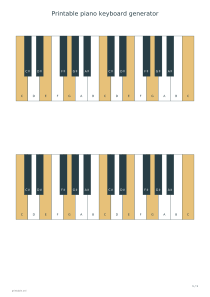
Each octave contains seven white keys and five black keys, with an additional C at the right end of the strip. The black keys appear in groups of two and three. Locate C immediately before a group of two, then follow the white-key sequence. Increasing the octave count repeats the pattern while keeping the drawing within the printable width.

Letter mode uses international C, D, E, F, G, A and B, with sharp names on black keys. Fixed-do mode uses Do, Re, Mi, Fa, Sol, La and Si for those same pitch classes. This is fixed pitch naming, not movable-do solfège. Blank mode removes the printed note names so learners can fill them in themselves.
Choose labels and highlighted notes

Enter highlight notes separated by commas, using C through B with # or b when needed. For example, C,E,G colours those pitch classes in every displayed octave. Db and C# select the same black key. Highlighting is a visual aid rather than an instruction to play a particular inversion, rhythm or fingering.

One or two octaves make a spacious sheet for identifying neighbouring keys. Three or four show repeated positions across a wider range, but each individual key becomes narrower. Change to landscape or A3 if you need room for handwritten finger numbers. Pair the layout with music staff paper when learners are connecting a keyboard position to notation.

Use a paper keyboard in a lesson

Make one labelled copy for checking and a second blank copy for recall. Ask the learner to find every C, mark a C major triad, then explain the two groups of black keys. Keep tasks short enough that the paper supports observation. For memorising names individually, add music flashcards with your own questions and answers.

The copies control repeats the same keyboard strip on one sheet; it does not create different exercises automatically. Use a handwritten prompt above each strip if the tasks differ. A guitar chord chart can support a cross-instrument lesson, but the keyboard diagram itself shows pitch locations only and contains no guitar fingerings.

Printable piano keyboard generator

Octaves: 1

For finding a first chord, choose one octave, three copies and letter labels. Enter C,E,G as the highlights. Every strip then contains eight white keys, five black keys and the marked C major pitch classes. Ask the learner to point to each marked name before using a real instrument.

Open this example

Octaves: 4

For an unlabelled classroom exercise, choose four octaves, one copy and landscape orientation. Select blank labels and clear the highlight field. The strip contains 29 white keys and 20 black keys. Students can label repeated C positions or shade their own scale; no answer sheet is generated automatically.

Open this example