Diagram type: Chords, separated by commas
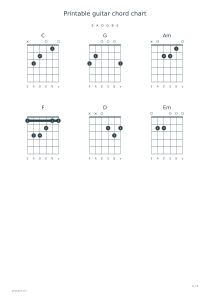
Use these settings: Diagram type: Chords, separated by commas; Chords, separated by commas: C,G,Am,F; Show finger numbers: Yes.
Open this exampleFree · No sign-up
Arrange guitar chord diagrams with finger numbers, open and muted strings, left-handed mirroring or blank grids for handwritten shapes.
Preview is scaled to fit. The PDF keeps the exact dimensions.
Build a guitar practice sheet around a progression such as C, G, Am, F. Keep the diagrams in playing order, or use blank chord boxes to write down shapes learned in a lesson.
Standard tuning runs E–A–D–G–B–E from low to high. A circle means open, × means muted, numbered dots show fingers and thick horizontal bars mark barres.
Enable left-handed diagrams to mirror the strings and fingering together. Tuning labels move with the strings, so the chord pitches stay the same.
Choose from the 16 shapes listed in the editor, separated by commas; repeated names are allowed. Blank mode prints 6, 12 or 24 empty five-fret grids.