Create printable find-and-count picture puzzles with original line drawings. Choose a theme and object density, then include an answer sheet showing every target and its count.
Live preview210 × 297 mm
A4
Preview is scaled to fit. The PDF keeps the exact dimensions.
PDF and Print include all pages. PNG and SVG save the page shown.
For true-size printing: choose 100% / Actual size, match the paper size and turn off headers and footers. Printing guide ↗
Ready for your printer
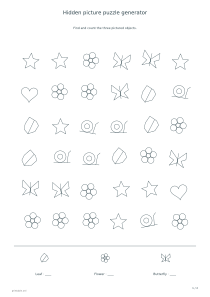
A picture-search worksheet asks learners to keep a visual target in mind while scanning a field of similar-sized objects. This generator places original line symbols in a reproducible arrangement, with three target kinds mixed among other shapes. The task is to locate and count those targets. It is an illustrated object search rather than a photograph or a promise of objects hidden inside a realistic scene.
💡A few useful answers
Are the objects hidden inside a large scene?
The worksheet is a field of original illustrated symbols with distractors, not a photorealistic landscape or a drawing with objects disguised inside other outlines. Targets vary in position and angle but remain fully visible. This explicit format lets the generator provide an exact count and mark every matching location on the answer sheet.
Does a dense sheet always mean a harder puzzle?
Dense means eighty-four objects. It usually involves more visual scanning than a smaller field, but it is not a measured difficulty rating. A familiar theme may feel easier than a sparse set of unfamiliar shapes. Start with a manageable quantity and use the preview to judge whether the symbols are comfortable to distinguish.
Can I upload my own picture or object list?
This version uses three built-in themes and their original vector symbols. It does not analyze an uploaded picture or recognize objects automatically. You can change the theme, density, colors, orientation and variant to produce another supported sheet, with a matching key derived from the same generated object data.
Choose a theme and a manageable visual field
✏️Garden, sea and desk themes each use a set of six object kinds. Three are shown in the target legend, while the other kinds act as distractors. The shapes are original vector drawings, so their outlines remain clear in the printable file. A target is defined by its pictured form and label, not by a color that might disappear on a monochrome printer.
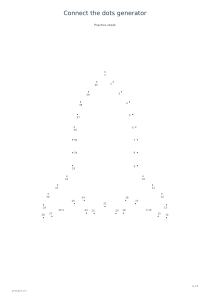
The sparse option places thirty-six objects, medium places sixty and dense places eighty-four. These settings control the number of symbols rather than assigning a tested difficulty or age level. More objects can require a longer search, but familiarity with the shapes and the learner’s scanning strategy also matter. A connect-the-dots activity offers a different, sequential visual task when open-ended scanning becomes tiring.
Search systematically instead of guessing
Objects receive small position and angle variations within a regular underlying layout. Their bounds are kept apart, so a learner does not need to infer a target from a partly covered outline. The same theme, density and variant number reproduce the same arrangement and counts. Changing paper orientation reorganizes the field while keeping the generated assignment reproducible for those settings.
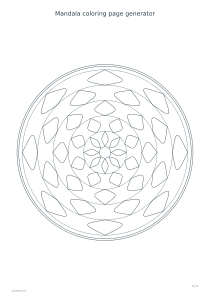
Encourage a deliberate route through the sheet, such as left to right and then down to the next row. A small pencil mark beside each found target can help avoid counting the same object twice. For another quiet illustrated activity, use mandala coloring pages; coloring and target searching are different tasks even when both involve careful attention to shapes.
Check both locations and totals
📝The legend leaves a blank for the count of each target. Before looking at the answer page, ask the learner to explain how they kept track of the search. They may find all objects but record the wrong total, or calculate correctly after missing one location. Separating those possibilities makes the follow-up more useful than simply marking a number wrong.
The answer sheet circles every target instance and prints the three exact totals. It uses the same arrangement, which makes comparison straightforward. Keep the answers separate while the activity is in progress. A word-search puzzle can extend the idea to letter sequences, but this page does not require reading a hidden word or recognizing a standardized vocabulary list.
Hidden picture puzzle generator
A garden search with answers
Choose the garden theme, sparse density and variant 17 on A4 portrait, with answers enabled. The first page contains thirty-six objects and three target-count blanks. The second page circles the targets in the same positions and supplies the exact total for each pictured kind.
Choose the sea theme, dense density and variant 31 on A4 portrait, then disable answers. The result is one sheet with eighty-four objects. Use a consistent row-by-row search and write the three totals in the legend; the variant can be restored later to produce a matching answer sheet.