Design printable bookmarks with your own text, dimensions and simple decorations. Arrange multiple copies on a sheet and optionally add matching backs for duplex printing.
Live preview210 × 297 mm
A4
Preview is scaled to fit. The PDF keeps the exact dimensions.
PDF and Print include all pages. PNG and SVG save the page shown.
For true-size printing: choose 100% / Actual size, match the paper size and turn off headers and footers. Printing guide ↗
Ready for your printer
A bookmark can carry a reader’s name, a short quotation, a reading prompt or a message attached to a gift. This maker keeps the physical size under your control and lays out several copies with clear cut boundaries. It produces text and vector decorations directly in the browser; you do not need to upload a photograph or use a predesigned image file.
💡A few useful answers
Will the bookmark print at the size I entered?
The vector output uses the entered millimeter dimensions. To retain them, choose the matching paper and actual-size or one-hundred-percent printing in your PDF viewer. A fit-to-page setting can change the result. Measure one test rectangle before cutting a full batch, because the printer and its driver control the physical paper output.
How do the back pages line up?
The generator mirrors each bookmark’s horizontal position on the back sheet while leaving the text readable. This supports a vertical-axis paper flip: normally long edge for portrait and short edge for landscape. Printer feeding and page-order conventions vary, so test front-to-back registration on plain paper before using finished stock.
Can I make different names in the same batch?
This version repeats one design and its text for the selected number of copies. It does not perform mail merge from a list of names. To make individually named bookmarks, change the name between exports or prepare separate designs. The copy count controls repetition of the current design, not a roster of different recipients.
Choose a size that suits the book
✏️Set the width between thirty-five and seventy millimeters and the height between one hundred and two hundred millimeters. Those values describe the finished cut rectangle. The layout adds space between bookmarks and fits as many complete copies as the selected sheet allows. It refuses a non-fitting size instead of silently reducing the physical dimensions to make it fit.
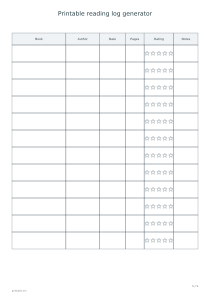
Think about how the bookmark will sit in the book. A narrow strip may be convenient for a compact paperback, while a wider design offers more room for a short reading note. Use the reading log generator for dates, page counts and longer reflections; a bookmark works best when its message can be understood without unfolding or turning through a separate record.
Compose a short readable message
The name or short-heading field accepts forty grapheme clusters, and the message field accepts one hundred and forty. These are limits, not a recommendation to fill every available line. A concise sentence is easier to read after the bookmark has been cut. Check the preview with the actual text, especially when a name or word is much longer than the surrounding entries.
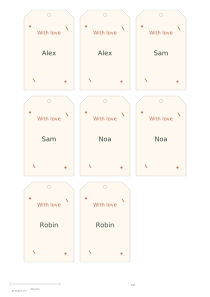
Choose botanical, stars, geometry or plain decoration. These are simple vector motifs that remain crisp in a PDF. The editor does not provide arbitrary photo uploads or a library of branded characters. For a present that also needs a separate recipient label, the gift tag generator can complement the bookmark without forcing gift-address information into its reading area.
Prepare front and back sheets carefully
📝One-sided mode exports only the front sheets. Adding backs produces all front sheets first and then the matching mirrored-position back sheets. The back-text field has its own one-hundred-and-forty-grapheme limit. It can hold a short note while the front carries the reader’s name, but the software cannot guarantee the mechanical registration of a particular duplex printer.
Print the front page range first, reload the sheets according to your printer’s manual duplex instructions, then print the matching back range. Do not send the complete fronts-then-backs document directly through automatic duplex: several front sheets would be paired incorrectly. Test one ordinary sheet using a long-edge flip in portrait or short-edge flip in landscape. Cut after checking alignment. For separate large lettering, use the letter stencil maker so the bookmark dimensions remain unchanged.
Printable bookmark maker
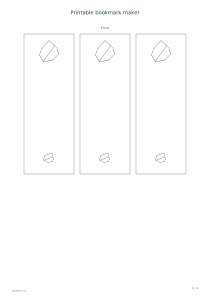
Three botanical bookmarks
Use A4 portrait, a width of fifty millimeters, a height of one hundred and forty millimeters and three copies. Select botanical decoration and leave double-sided printing off. One sheet holds three matching bookmark fronts at their actual cut size, ready for your own short text.
Keep the same dimensions on A4 portrait, choose six copies, stars and double-sided printing. The document has two front sheets followed by two corresponding back sheets. Add back text if needed, then test the duplex flip and sheet order before printing the final material.