💡A few useful answers
Which fractions appear?
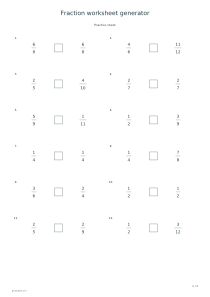
Choose a maximum denominator of 6, 12 or 20. Comparison and arithmetic use proper positive fractions; subtraction never gives a negative answer. Equal-denominator mode makes the first practice set easier.
How are the answers written?
Solutions are reduced to lowest terms. Addition may produce an improper fraction; whole-number results are written as integers. Comparison answers use “less than”, “greater than” or =, including equal pairs.
How can I vary the worksheet?
Select one task or mix all four, then change the arrangement code for another set. Each sheet holds 12 numbered exercises. PDF keeps all practice pages followed by the optional answers.
Fraction worksheet generator
Maximum denominator: 6
Start a first comparison lesson with small, matching denominators so learners can focus on numerators. Use these settings: Operation: Compare fractions; Maximum denominator: 6; Number of exercises: 12; Same denominators: Yes; Add answer sheet: No; Arrangement code: 11.
Open this example ↗Operation: Mixed
Use the mixed set for revision; separate answers let pupils check their work afterwards. Use these settings: Operation: Mixed; Maximum denominator: 20; Number of exercises: 24; Same denominators: No; Add answer sheet: Yes; Arrangement code: 257.
Open this example ↗