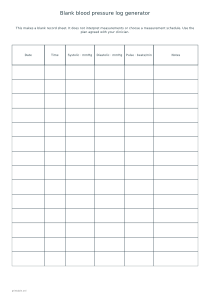
Prepare a blank paper log with date, time, systolic and diastolic columns. Choose the number of days and spaces, then record readings by hand using your agreed measurement plan.
Live preview210 × 297 mm
A4
Preview is scaled to fit. The PDF keeps the exact dimensions.
PDF and Print include all pages. PNG and SVG save the page shown.
For true-size printing: choose 100% / Actual size, match the paper size and turn off headers and footers. Printing guide ↗
Ready for your printer
This editor creates a record sheet, not a measurement or interpretation tool. It has no field for entering blood pressure values and calculates no averages, ranges or alerts. The number of rows is a layout choice, not a recommendation about how often to measure. Use the schedule and recording details agreed with your clinician, and select enough blank spaces to make that plan easy to follow on paper.
💡A few useful answers
Does the log tell me whether a reading is normal?
No. The printable contains blank recording fields without thresholds, diagnostic labels, warnings or treatment suggestions. It does not calculate an average or interpret changes. Review measurements through the care arrangements you already use.
Does choosing two rows mean I should measure twice daily?
No. One or two rows per day is only a space-allocation control. Select the layout that matches the plan agreed with your clinician. The generator does not determine the appropriate frequency or timing of measurements.
Can I share a completed record through this editor?
This editor has no measurement-entry or image-upload feature. Share can publish its title and blank-template settings, not handwriting added after printing. Keep any personal information out of the title when making a public example.
Choose the blank spaces you need
✏️The Days setting offers seven, fourteen or twenty-eight days. Each day receives one or two blank rows according to the layout you choose. Fourteen rows fit on a sheet, so a seven-day layout with two rows per day produces one page. The time column remains blank for the actual time of a reading. The generator does not label rows as required morning or evening sessions, because the timing belongs to your own measurement plan.
An optional first date fills the date column in year-month-day form and advances it one calendar day after the chosen number of rows. This is useful when preparing a sequence of pages for a known period. Leave the date empty if the sheet will be used at irregular intervals or if you prefer handwriting. The date setting does not schedule reminders. For a broader view of appointments and other events, use the monthly calendar editor separately.
Make dates and columns readable
Systolic and diastolic columns are labelled in millimetres of mercury, written mmHg. The optional pulse column is labelled in beats per minute. These headings help keep the different recorded quantities separate; they do not provide a comparison standard. Copy what you intend to record carefully, keeping the two pressure entries in their corresponding columns. No entered number is analysed here, because measurements are written on the printed sheet rather than typed into this editor.
The notes column can be included when you need room for an observation or a question to discuss. Turning it off gives the remaining columns more width. Turning pulse off also simplifies the table when that column is not part of the record you need. The generator does not decide which observations are clinically relevant. If a short note needs more explanation, a matching lined note sheet can keep additional writing separate from the measurement rows.
Keep the paper record together
📝Preview the selected paper size and orientation before printing. Landscape gives each column more horizontal room, while portrait may fit better in a folder. A3 makes a larger paper record without changing the number of rows on each page. Headers repeat on every sheet of a longer log so that a detached page remains understandable. Add an optional title if it helps identify the period or purpose, and keep enough margin for your preferred filing method.
PDF and Print include every sheet in the configured log. PNG and SVG export only the page selected in the preview. A Share link contains the blank-template settings and selected blank preview, rather than handwritten readings that the browser never receives. Avoid putting personal health details in a public title. A general checklist can accompany the log for administrative tasks, but neither printable replaces instructions or review from the professional responsible for your care.
Blank blood pressure log generator
A seven-day sheet with two spaces each day
Choose seven days and two blank rows per day. Keep Pulse and Notes enabled and leave the first date empty on A4 portrait. The result is one fourteen-row sheet with space to write dates, times and readings by hand.
Choose twenty-eight days and one row per day, switch Pulse off and keep Notes on. Leave the first date empty. A4 portrait creates two pages of fourteen rows, each repeating the date, time, pressure and notes headings.