Print connected petal layers and a separate centre for a flat paper flower. Choose the diameter, petal count and number of layers, then cut and arrange the pieces by hand.
Live preview210 × 297 mm
A4
Preview is scaled to fit. The PDF keeps the exact dimensions.
PDF and Print include all pages. PNG and SVG save the page shown.
For true-size printing: choose 100% / Actual size, match the paper size and turn off headers and footers. Printing guide ↗
Ready for your printer
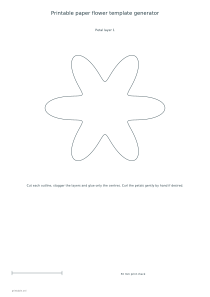
The largest layer determines the flower’s stated diameter. Additional layers use seventy-eight and fifty-six percent of that size, giving a stepped arrangement without requiring you to resize pages in a print dialog. Each layer receives its own sheet, followed by a sheet for the centre. Choose plain outlines for your own paper and decoration, or enable the colored artwork for a ready-colored printed set.
💡A few useful answers
Are the petals separate pieces?
No. Every layer is one connected scalloped outline. You cut its outside boundary and stack it with the other complete layers. The centre is a separate circular piece that can cover the small glued area.
How big are the smaller layers?
The second layer is seventy-eight percent of the selected largest diameter, and the third is fifty-six percent. The generator applies those proportions to the original geometry, so you do not need to scale individual print pages manually.
Can I make a flower with a stem?
This set provides flat layered petal pieces and a centre only. It has no stem template or attachment system. You can use the finished paper layers as a decoration, but any additional support is a separate craft decision.
Choose a shape and layered size
✏️Five, six and eight petals create different rhythms around the flower. Each layer is a single continuous scalloped shape, so there are no loose individual petals to position before assembly. The inward curves stop well short of the centre and keep the piece connected. The result is a stylized paper flower rather than a botanical diagram. Choose the petal count for the look you want, without expecting it to identify a real plant species.
The largest diameter can be sixty, eighty, one hundred, one hundred and twenty or one hundred and sixty millimetres. One layer gives a simple silhouette; two or three add smaller shapes above it. The centre is selected separately at fifteen, twenty or twenty-five millimetres. These measurements describe the printed outlines. If you curl a petal after cutting, its visible projected width may change, even though the underlying cut piece is the same size.
Cut connected pieces carefully
Print at actual size and check the fifty-millimetre reference before cutting. A large layer needs sufficient printable space, so a smaller sheet or a short landscape page can produce a fit error. Change the paper size or the chosen flower diameter instead of relying on automatic printer scaling. The ruler template offers another measurement reference when preparing a group activity with pieces that need to match.
Cut around each outside petal boundary and keep the centre connected. Lay the largest piece down first, add the next size and rotate it slightly so its petals show between those below. Glue the central area rather than coating every petal. That leaves the outer edges free to lift or curl gently by hand. A plain trial can help you decide whether your paper is flexible enough for the effect you want. There is no stem, wire holder or vase pattern in this set.
Build a simple paper decoration
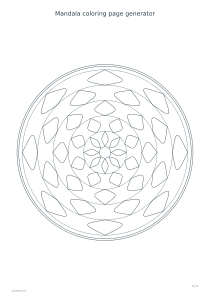
📝Colored mode fills the layers with a coordinated palette. Plain mode is useful for colored paper, painting or pencil decoration; changing the ink color changes the outline, while the background setting affects the printed sheet. Consider whether that background uses more ink than your project needs. For another radial drawing activity, use the mandala generator, whose repeated patterns are intended for coloring rather than cutting and stacking.
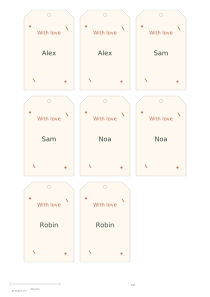
PDF and Print contain all selected layers plus the centre page. Use the preview selector to export an individual layer as SVG or PNG. A public Share link preserves the dimensions and selected piece for a collaborator. Assemble a flower as a card decoration, a classroom display element or a small gift accent, then pair it with a gift tag if a separate written message is needed. Cutting accuracy and material choice remain part of the handwork.
Printable paper flower template generator
A three-layer six-petal flower
Select a 120 mm diameter, six petals, three layers and a 20 mm centre, with colored artwork off. A4 portrait creates four sheets: three progressively smaller connected layers and the centre. Print at actual size before cutting and staggering the petals.
Choose an 80 mm diameter, eight petals, two layers and a 15 mm centre. Enable colored artwork on A4 portrait. The three-sheet export contains two petal layers and one centre, giving a smaller project with fewer pieces to assemble.