Finished poster width: 300 mm
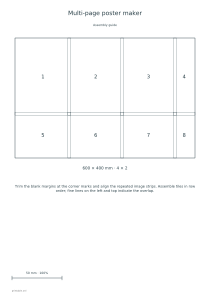
Use these settings: Finished poster width: 300 mm; Overlap: 5 mm; Orientation: Portrait; Assembly guide: Yes.
Open this exampleFree · No sign-up
Print a large picture across ordinary sheets with a chosen finished width, overlap strips and an assembly map.
Preview is scaled to fit. The PDF keeps the exact dimensions.
Trim the blank margins at the corner marks and align the repeated image strips. Assemble tiles in row order; fine lines on the left and top indicate the overlap.
JPG, PNG and WebP uploads up to 10 MB become a JPEG of at most 2000 pixels on the long edge. Enlargement can look soft; the editor shows effective PPI. Share makes this prepared picture public to link holders.
Choose the matching paper and print at 100% without fitting. The optional map includes a 50 mm check line. A poster is limited to 36 image sheets, plus its assembly map.