Stitches per 10 cm: 20
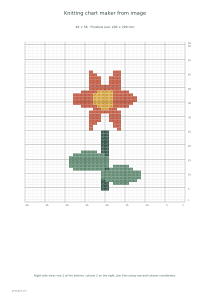
Use these settings: Pattern width · cells: 40; Stitches per 10 cm: 20; Rows per 10 cm: 28; Maximum colors: 3; Chart cell · mm: 4; Chart style: Color + symbols.
Open this exampleFree · No sign-up
Turn a picture into a colorwork knitting chart with a limited palette and rectangular cells matched to your stitch and row gauge.
Preview is scaled to fit. The PDF keeps the exact dimensions.
Knitting chart maker from image
Measure stitches and rows over 10 cm on your swatch. Upload a simple image, choose its stitch width and compare the resulting chart before knitting.
At 20 stitches and 28 rows per 10 cm, a square motif 40 stitches wide needs 56 rows. Rectangular chart cells show its approximate knitted proportions.
A color chart describes the motif, not garment shaping or a complete knitting pattern. For flat work, alternate reading direction; for rounds, read each row from right to left.
Increasing row gauge adds rows while keeping the image shape. The grid is limited to 96 × 96 cells, so tall images may use fewer columns than requested. Start with two or three contrasting yarns.