Line height: 14 mm
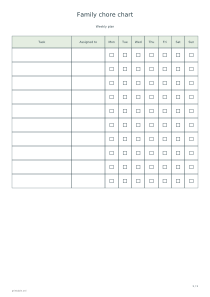
Use these settings: Line height: 14 mm; Extra blank rows: 3; Task: Task | Assigned to | 1,3,5; First day of week: Monday.
Open this exampleFree · No sign-up
Make a weekly chore chart with assigned names and checkboxes for selected days. Add household tasks, choose row height and print a shared schedule.
Preview is scaled to fit. The PDF keeps the exact dimensions.
Family chore chart
Each row pairs one task with a person. Only scheduled days receive a checkbox; other days show a dash so the intended rhythm stays clear.
Yes. Enter task | person | 1,3,5 for Monday, Wednesday and Friday. Day numbers always mean Monday 1 through Sunday 7, even in a Sunday-first week.
Agree on what counts as finished before using the chart. Review unchecked boxes together; the sheet records planned work without scoring family members.
Add blank rows when responsibilities may change. Larger rows give room for handwritten notes, while a long task list continues on extra pages.